
Alt text generator with a WCAG check on every image

This alt text generator reads each picture and writes one short sentence, at most 125 characters, that tells a screen reader user what the image shows and why it is there. Add the page topic and the line fits that page; switch on shop mode and it names the colour, material and shape of a product. Every result lands in an editable table with a WCAG check, so you can fix a line before it goes live.

Last updated:

Output

One line of at most 125 characters that stands in for the image.

Language
Tone

Public http(s) image links, one per line or in any CSV column.

Sign up free, get 2 credits

Alt text costs 2 credits an image. Failed jobs are refunded.

Real runs

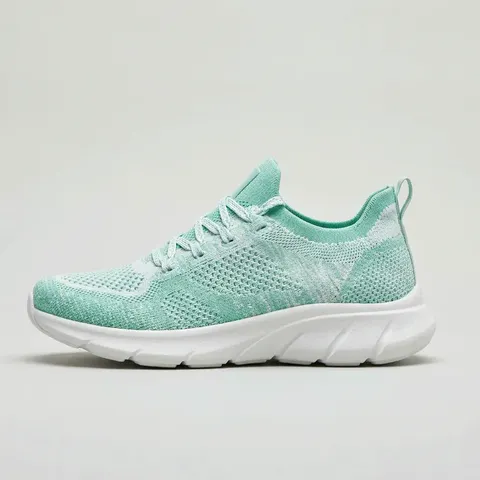
A mint green and white knit sneaker with a white cushioned sole.
Alt textmint-knit-sneaker.jpgPass

alt=

A mint green and white knit sneaker with a white cushioned sole.

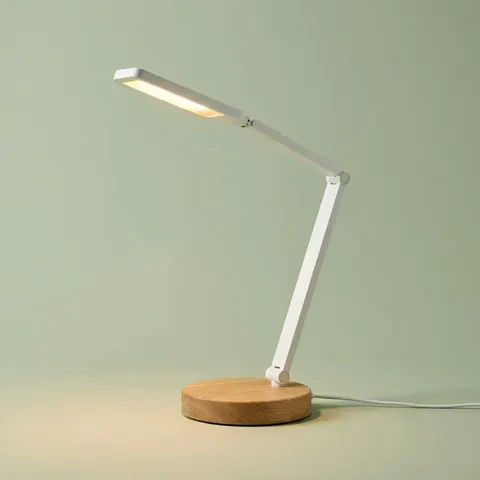
A white LED desk lamp with an adjustable arm and a round, light-wood grain base on a pale green background.
Alt textdesk-lamp-oak-base.jpgPass

alt=

A white LED desk lamp with an adjustable arm and a round, light-wood grain base on a pale green background.

A white candle in a brown glass jar with a wooden wick and a separate round cork lid on a beige background.
Alt textamber-jar-candle.jpgPass

alt=

A white candle in a brown glass jar with a wooden wick and a separate round cork lid on a beige background.

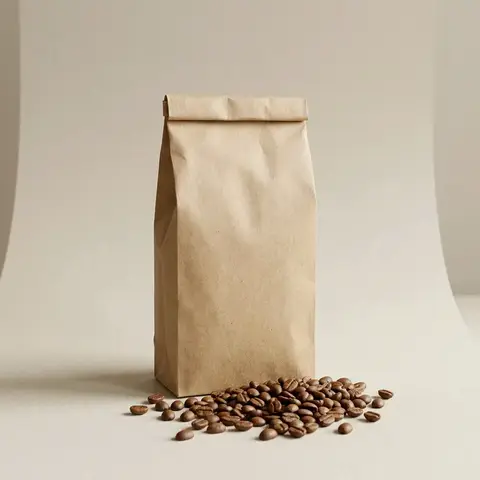
A blank brown paper coffee bag standing upright with a pile of roasted coffee beans in front on a beige background.
Alt textcoffee-bag-beans.jpgPass

alt=

A blank brown paper coffee bag standing upright with a pile of roasted coffee beans in front on a beige background.

Good for

  • Blog and news images that went live without a description
  • Product photos that need consistent, factual wording
  • Images on a site that is about to have an accessibility audit
  • Describing images in another language than the page you started from

How to use it

  1. 1

    Add your images

    Drop JPG, PNG or WebP files up to 10 MB each, paste image URLs, or upload a CSV of URLs. A batch can hold up to 500 images.

  2. 2

    Pick the output, language and tone

    Choose a short line, caption, long description or chart description, one of 30 languages and a plain, detailed or friendly tone. Add the page topic if the same picture means different things on different pages.

  3. 3

    Check, edit and export

    Read each row with its WCAG check, edit anything that is off (edits are saved), then export CSV or JSON, or copy ready HTML with the alt attribute filled in.

What good alt text does

WCAG success criterion 1.1.1 asks for a text alternative that serves the same purpose as the image. That usually means the subject, the action and anything the reader needs from the picture, in one sentence. It does not mean every detail: a screen reader reads it inline, so a short, specific line works better than a paragraph. Leave out "image of" or "picture of", since the screen reader already says it is an image. If the picture contains words, such as a sign or a button label, those words belong in the description.

How the WCAG check works

Each row is checked in code, not by the model. An empty line on an image that carries meaning, a line over 125 characters and a line that is just a file name fail the check. A line that starts with "image of", one that leaves out text visible in the picture, and an image that looks purely decorative get a warning, so you can decide. The check catches the common mistakes; it cannot tell whether a description fits your page, so read the rows before you publish them.

Context changes the right answer

The same photo of a red bicycle needs a different line on a bike shop page, a city cycling guide and a blog post about a commute. Type the page topic, up to 160 characters, and the generator writes for that context. For a product page, shop mode adds the attributes you can see, such as colour, material and shape, and leaves out claims it cannot see, such as size or price.

What it costs

Alt text costs 2 credits an image, a long description 4 and a chart description with its data table 5. Every image in a batch costs the same, and failed jobs are refunded. Images are read by Gemini Flash. Credit packs start at $2.65. See plans and packs

Questions

How long should alt text be?

Keep it under about 125 characters. The generator stays under that limit and the WCAG check fails any line that goes over it. If an image needs more words, such as a chart or a diagram, use a long description as well.

Does it identify people in photos?

No. People are described by what is visible, such as "a woman in a yellow raincoat holding an umbrella", and are never named or identified, even well-known faces.

Can I edit what it writes?

Yes. Every cell in the results table is editable and your edits are saved with the job, so the export always holds the version you approved. You can also re-run a single row.

Is the result good enough to publish as is?

Often, but treat it as a strong first draft. The model can miss what matters on your page, and only you know why the image is there. Review the table before publishing; it is not a substitute for a full accessibility audit.

What happens if an image fails?

The row shows the reason and the credits for that image are refunded automatically. You can fix the file or URL and run the row again.